Study Planner: Plan Sessions by Class and Topic, and Reschedule What You Miss
A study planner guide to map sessions by class and topic, handle missed blocks, and build a weekly plan you can restart when school gets busy.
By Ultimate Student Planner by Cosmo Suite · Editorial policy
Published · 7 min read

It’s Sunday evening. Three classes have work due soon, and the plan you made on Monday no longer fits. A study planner is a weekly record that connects each session to a class, topic and date. Ultimate Student Planner, a Google Sheets and Excel planner by Cosmo Suite (ultimatestudentplanner.site), records sessions and keeps missed topics on a to-reschedule list.
Its Study Plan tab records a date, class, topic, planned time and done time. Missed sessions go to a “to reschedule” list. This guide shows how to plan by class and topic, then pick the plan back up when a session slips.
The Short List
- Give every session a class, topic and date.
- Plan around your actual classes and commitments.
- Treat a missed session as something to reschedule, not a reason to restart.
- Review the next week before adding more work.
Why a study planner needs a recovery step
Give each session a place to move when plans change. Keep its topic in view, choose another open time, and adjust the remaining sessions around what is still due.
Make each session specific enough that you know what to begin. “Study biology” is broad. “Review the cell transport notes for biology” gives you a starting point. You can split a large topic into smaller sessions if it will not fit in one block.
Your class schedule, work shifts, commute, family time and energy can change. Use the plan to choose the next session, then update it when the week changes.
If a spreadsheet would help you keep class details together, see a student planner in Google Sheets and Excel. If your due dates are scattered across syllabi and class pages, first bring them into one list. The student planner guide for organizing each class’s due dates explains that setup. Then use the study plan to decide what you will do with the time you have.
A study planner by class and topic
A useful weekly plan connects each session to a class and a topic. Add a date and a planned time, then record whether you completed it. If you did not, move the topic to an open block or your reschedule list.
Here is a hypothetical example. The course names and session lengths are only there to show how the plan can be laid out. Use your own syllabus and schedule to choose topics and times.
| Day | Class | Topic | Planned time | Status |
|---|---|---|---|---|
| Monday | Biology | Cell transport notes | 35 minutes | Done |
| Tuesday | History | Outline two lecture themes | 30 minutes | Move to Thursday |
| Wednesday | Statistics | Work through class examples | 40 minutes | Done |
| Thursday | History | Lecture themes, then check notes | 30 minutes | Planned |
| Saturday | Literature | Review reading notes | 25 minutes | Planned |
Leave open space where your week needs it. If Tuesday’s session gets missed, “History” and “lecture themes” still tell you what to move. The session name shows what to pick up again. Oregon State’s Academic Success Center study-session worksheet also prompts students to name a course, topic, goal and session length before laying out the week. (Planning Your Study Session) Give each column one clear job. The date answers when you plan to sit down. The class tells you which course notes or materials to open. The topic names the next action, such as reviewing a lecture section or working through class examples. Planned time is your estimate before you start. Done time records what you actually spent. If the topic needs another session, add another dated row so the next step stays visible.
A plan can also show when the same topic needs another session. Put each session on its own row. That makes it easier to move one date without losing the next step. If you already have a semester calendar, use it to spot due dates before choosing study blocks.

Build a weekly study plan from your real course list
Start with the next seven days, not the whole semester. A short view is easier to update when a class changes its reading or you need another evening for work.
- Gather the topics. Check the next lessons, readings, problem sets or exam topics listed by your instructors. Keep each item tied to its class.
- Pick a small next action. Turn a topic into something you can begin, such as reviewing notes or working through examples from class. Avoid writing a vague block like “catch up.”
- Mark fixed commitments. Put classes and appointments on the week first. Cornell’s Learning Strategies Center recommends accounting for fixed and flexible time, then naming the subject you plan to study instead of writing only “study.” (Cornell schedule guidance)
- Place sessions where they can happen. Choose times that work with your class schedule and other responsibilities. Leave some open space so a change does not break the entire plan.
- Check the plan once more. Look at due dates and exams. The University of Washington Academic Support Programs recommends scheduling around due dates so you can spot deadline conflicts. If two sessions compete for the same evening, move one now. (Studying)
Keep the planned time realistic for your own week. Course demands and school schedules differ, so use your syllabus and instructor guidance instead of a generic daily quota. If the week looks full, check the fixed commitments before adding more blocks. See whether a topic can be split into a smaller next action, or whether it can move to another open day. Your schedule should show the time you have, not the time you wish you had.
Some topics depend on an earlier step. For example, you may want to gather lecture notes before outlining themes. Put those actions in order so the first session gives you what you need for the next one. If a class changes its reading or exam date, edit the topic and date before carrying the old plan forward. The University of Minnesota Duluth recommends revising a weekly plan as needed and scheduling study time around class periods. (weekly schedule steps)
For the fields in a course-level plan, see the study plan template with class and topic fields.
What to do when you miss a study session
Move the topic to another open slot, then check the rest of the week. The University of Minnesota Duluth suggests revising a weekly schedule when needed, so review each later session before changing it too. (weekly schedule steps)
In the example table, Tuesday’s history session moves to Thursday. Before keeping that change, check what else Thursday contains. If it is already full, split the topic into a smaller next action or choose another open day. Keep the original due date in view so the moved session does not disappear from your planning.
When you return after a few days away, review three things:
- What is due next?
- Which topic needs a first or next session?
- Where is there an open time that can fit it?
Move only the items that still matter. Some topics may be complete, changed by the instructor, or no longer urgent. A quick review helps you avoid carrying an old plan forward unchanged. After you move a session, look at the due dates around it. If two large topics now land on the same evening, choose the next action that needs attention first and place the other one in a real open slot. A study planner helps you see that choice. It cannot tell you which course matters most, so keep the syllabus and instructor directions close.
During finals, work backward from each exam date and list the topics you need to cover. The finals study schedule guide shows a dated way to arrange the remaining sessions. Keep the approach flexible because class requirements and available time vary.
How the Ultimate Student Planner handles this
Ultimate Student Planner has a Study Plan tab with fields for date, class, topic, planned time and done time. You can mark a session complete. Missed sessions move to a “to reschedule” list, so the topic remains visible when the week changes.
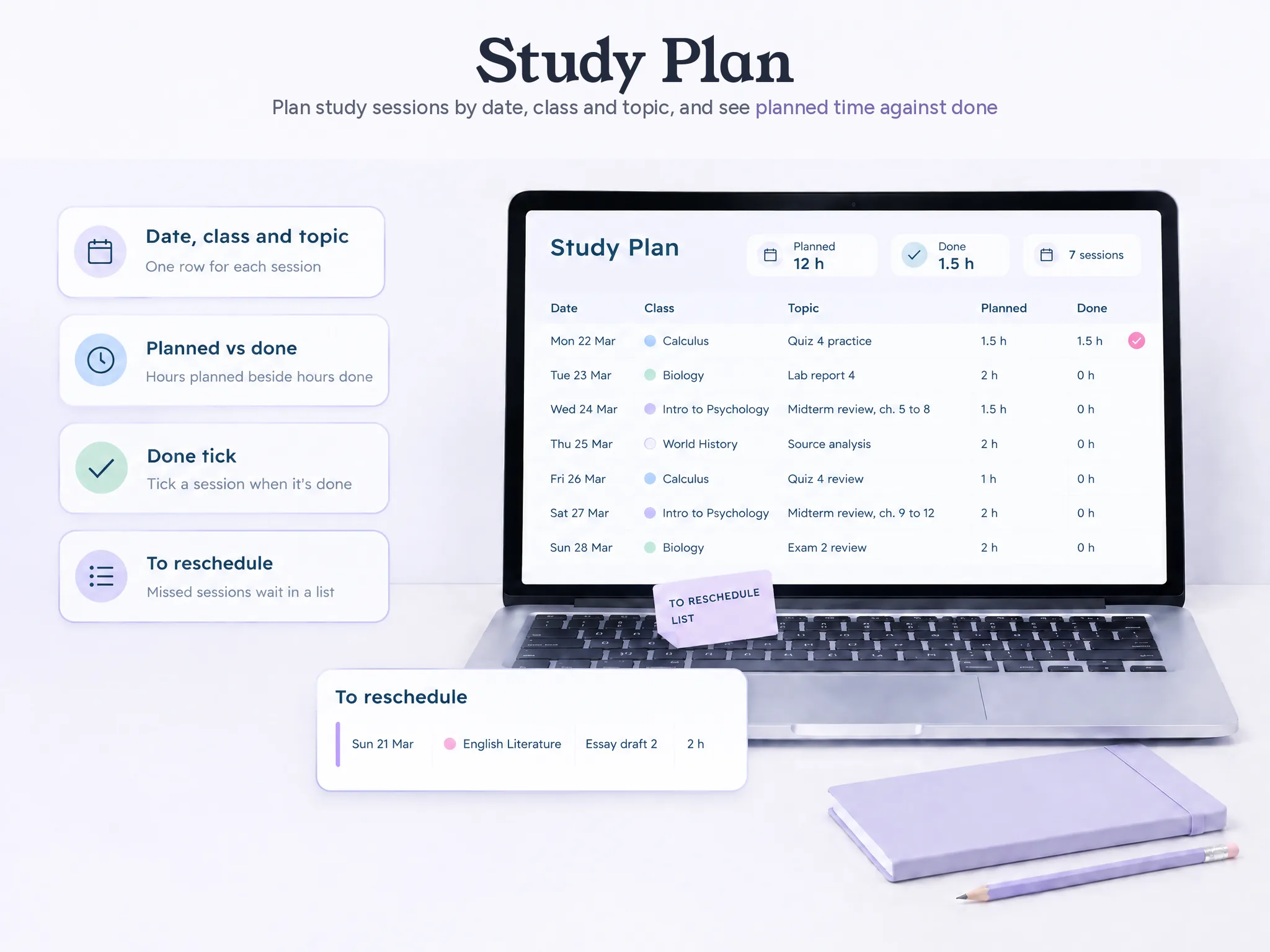
The planner comes as a Google Sheets file and an Excel file, each with a sample copy and a clean copy. The sample shows a filled-in semester. The clean copy is for starting another semester. The product does not sync with school portals or calendar apps, and it does not send reminders.
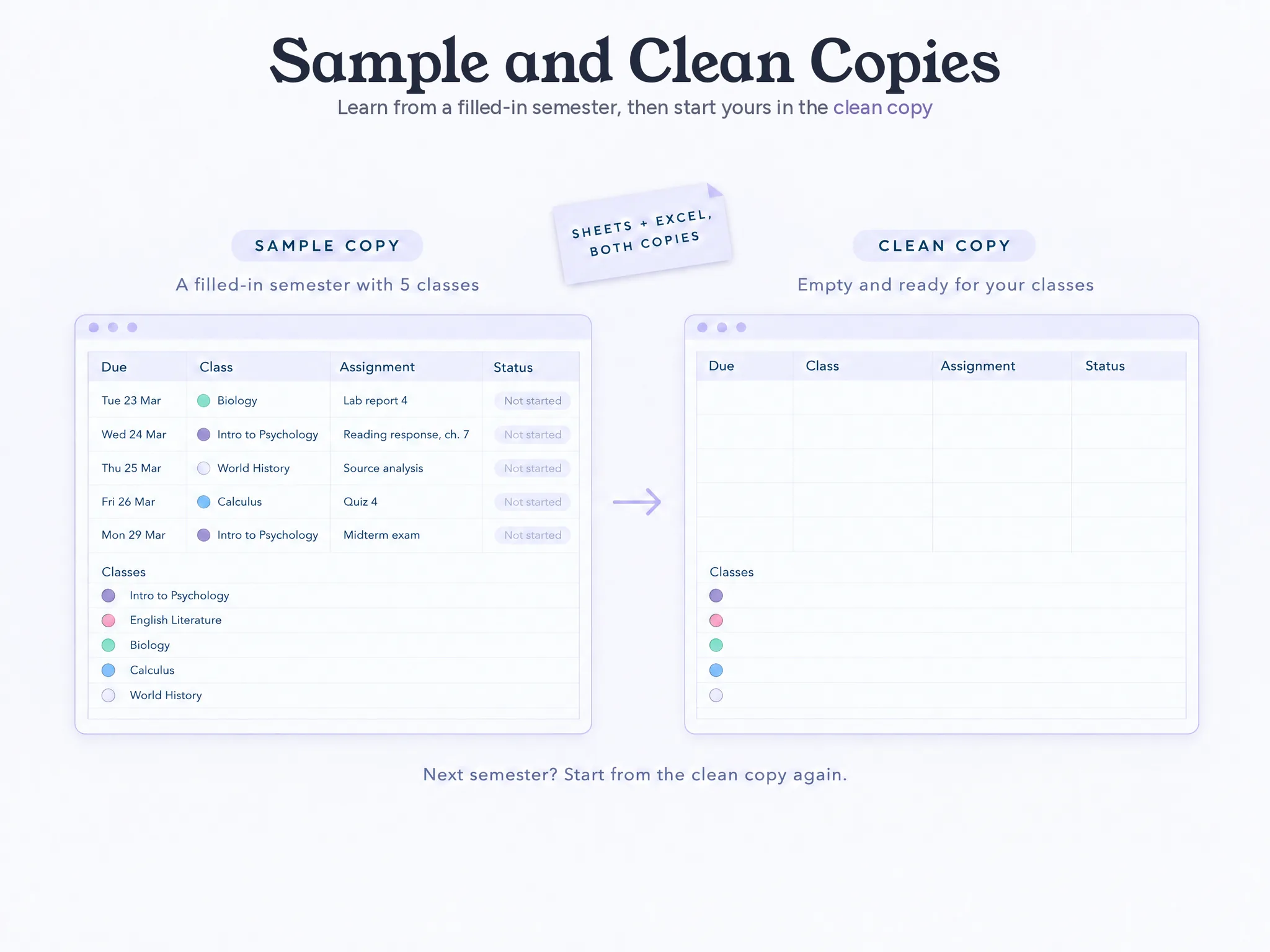
If keeping each class separate helps you scan a busy week, the planner uses a colour for each class across its tabs. See the student planner spreadsheet that sorts class dates and study plans for the product details.
Keep the plan small enough to use
A study planner should answer two questions: what is the next topic, and when might you work on it? Add more detail only when it helps you start or reschedule a session.
At the end of the week, move unfinished topics into the next plan. Cross out anything that no longer applies. Then start with the next date on your schedule. You can pick it back up without pretending the missed week never happened.

About us: Ultimate Student Planner is a Google Sheets and Excel product by Cosmo Suite. Product details were checked against the approved contents list. The example week is hypothetical and shows a format, not a recommended result. Schedule guidance links to Cornell Learning Strategies Center, University of Minnesota Duluth, Oregon State Academic Success Center and University of Washington Academic Support Programs. All checked 10 Nov 2026.
Frequently asked questions
Does this study planner approach work for high school?
Yes. The same class-and-topic plan can work for high school or college. Use the schedule and deadlines that apply to your school.
What should a student study planner include?
Start with the date, class, topic, planned time and whether you completed the session. Add a short note when you need to move it.
What should I do if I miss a study session?
Move the topic to another open slot or a reschedule list. Then check whether the new week still has room before adding more.
How many hours should I study each day?
There is no one daily number that fits every student and course. Use your syllabus, deadlines and available time to make a plan you can review.
How do I plan study sessions during exam weeks?
List each exam date and the topics you still need to review. Place sessions in open blocks, then leave room to move one if your week changes.
Should I put study sessions on my calendar?
A calendar can show when a session might fit. A separate class-and-topic list helps you see what the session is for and what still needs attention.
Can a spreadsheet help me plan study sessions?
Yes. A spreadsheet can keep class, topic, date and planned-versus-done time together. Ultimate Student Planner includes a Study Plan tab in Google Sheets and Excel.
Sources
- Ultimate Student Planner product details
- Cornell Learning Strategies Center, Guidelines for Creating a Study Schedule
- University of Minnesota Duluth, 5 Steps to Manage Your Weekly Schedule
- Oregon State Academic Success Center, Planning Your Study Session
- University of Washington Academic Support Programs, Studying
Keep reading
Study Planning
Study Planner Template: Sessions, Topics and Planned vs Done Time
Study planner template with five fields that survive week 3: date, class, topic, planned time and done time, plus one filled example week.
· 8 min read
Study Planning
How to Create a Study Plan You Can Pick Back Up After a Bad Week
How to create a study plan in four stages: classes, due dates, weekly slots, and a reschedule list that gives a missed session a clear place to go.
· 7 min read
